
Before you start
- A modern browser; no sign-in is needed.
- Sample JSON with no real API keys.
Applies to the interface reviewed on 2026-10-16 · Verification details
At a glance
- Formatting exposes structure; minifying removes formatting whitespace.
- Represent long identifiers as strings when exact digits matter.
- Correct errors before copying or downloading the result.
Run a small example
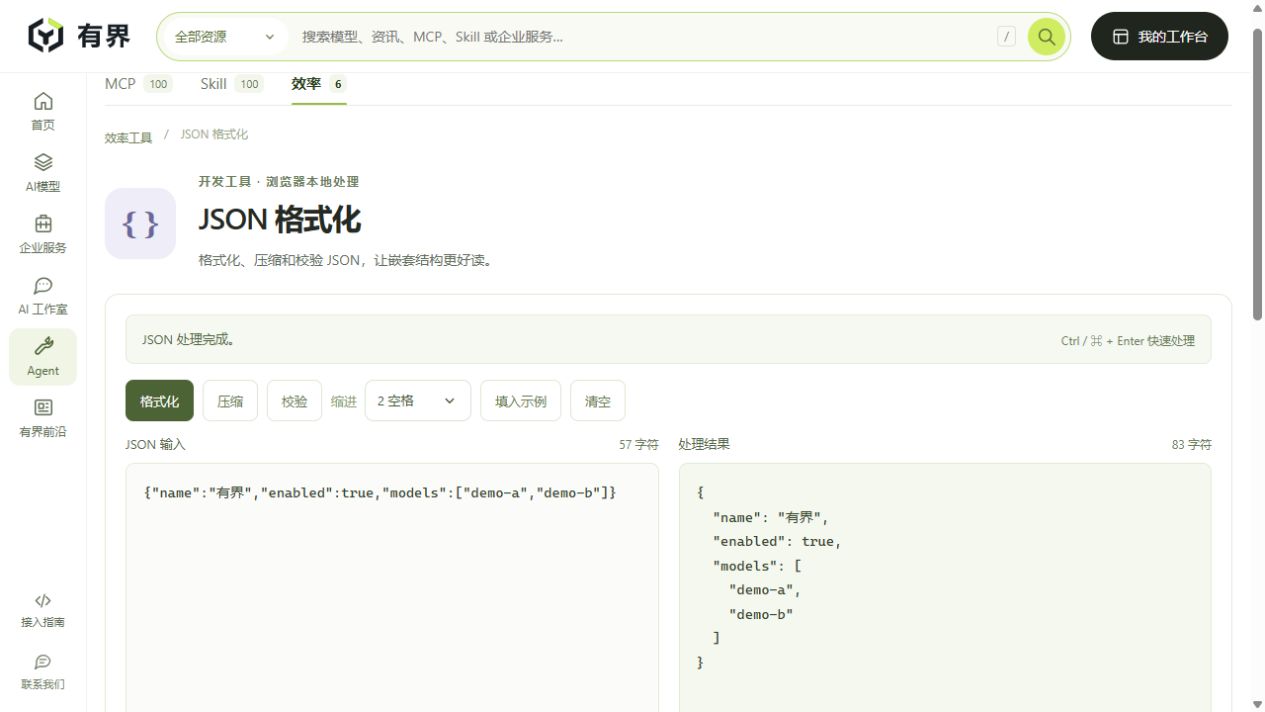
Open the JSON tool (Chinese interface). Paste the following into the input, select two-space indentation and choose 格式化 (format). The output should show an indented object while preserving the Chinese text.
{"name":"有界","enabled":true,"models":["demo-a","demo-b"]}
Choose 压缩 (minify) to remove formatting whitespace. These operations do not call a model or infer what a field means. The example has been checked against the current tool implementation.
Diagnose invalid JSON
A trailing comma before the closing brace makes the object invalid. Other common causes are unmatched brackets, single-quoted property names and comments. Use the error message to locate a problem, then inspect the original input. The tool does not guess how malformed data should be repaired. An empty input is not valid JSON either.
Preserve long identifiers
The input {"id":9007199254740993} is rejected because it exceeds the safe integer range. If this is an identifier rather than a quantity, use {"id":"9007199254740993"}. Adding quotes after another application has already rounded the value cannot recover the original digits.
Copy, download and continue
Copy and download actions become available after a successful operation. The reuse action moves the result into the input for another step. Editing input clears stale results, so process it again before copying. The download is a JSON file, not an automatically validated API payload.
Know what the tool checks
This is a syntax and formatting utility, not a JSON Schema validator or business-rule checker. Input is processed locally in the browser. Your device manages downloaded files and clipboard contents. Continue with the API walkthrough to check protocol-specific request fields and model identifiers.
Sources & verification
Worked examples checked against the current browser-tool implementation; screenshots, where included, show actual local operations.
- JSON formatting tool →有界 YOUJIE · Checked Oct 16, 2026